
Spreadsheets
Wedding Budget Command Center: Every Vendor, Every Deposit, Every Dollar
Enter your costs and let the formulas do the math.
The details
- Format: Spreadsheet
- Delivery: instant digital download, nothing ships
- Use: print at home or use on a tablet, reprint forever
What the Wedding Budget Command Center Is
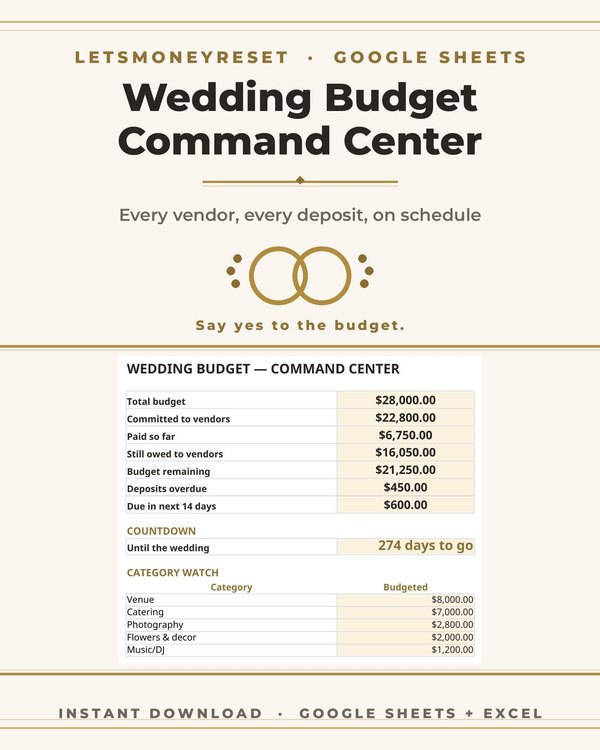
Wedding costs spread across a dozen vendors, each with its own deposit schedule, balance due date, and payment method. This Google Sheets workbook pulls all of it into one command center: every vendor, every quote, every deposit paid, every balance still owed, with formulas that keep the running total honest.
Enter your costs once and the sheet does the math. You always know three numbers: what you have committed, what you have paid, and what is still owed. No more mental math, no more surprise balances two weeks before the wedding.
How Vendor and Deposit Tracking Works
Each vendor gets a row: category, vendor name, quoted price, deposit amount, deposit paid date, balance due, and due date. The sheet totals each category, so you can see at a glance that catering is 40 percent of your budget while flowers are 6 percent. When a vendor sends a revised quote, you update one cell and every total recalculates.
Deposit tracking is where couples get burned without a system. Deposits are due at different times, balances hit in the final month, and final headcounts change catering totals late in the game. The tracker keeps every due date visible so nothing slips, and the paid vs owed columns show your real cash position at any moment.
Setting a Wedding Budget That Holds
Most couples set a wedding budget as one big number and then watch it dissolve across vendors. A better approach is allocating by category first: venue, catering, photo and video, attire, flowers, music, and everything else. The spreadsheet makes this natural because each category has its own section with its own subtotal.
When one category runs over, the sheet shows you exactly how much you need to pull from another. That tradeoff is visible and deliberate instead of discovered after the fact. Couples who track this way consistently report the same thing: the wedding cost what they planned, because the plan was real.
Why a Spreadsheet Beats a Wedding Binder
Paper wedding planners are lovely, but wedding math changes constantly. Quotes get revised, guest counts shift, deposits get paid. On paper, every change means recalculating by hand. In this spreadsheet, every change ripples through the totals instantly.
Sharing is the other advantage. Both partners, and a parent who is contributing, can open the same sheet and see the same numbers. No more 'I thought the photographer was $2,000' conversations. The sheet is the single source of truth, accessible from any phone or laptop.
Who This Is For
It is for engaged couples planning the wedding themselves, without a planner managing the money. It is for couples splitting costs with family who need clean numbers everyone can see. It is for anyone whose wedding budget lives in a notes app, a pile of emails, and a growing sense of dread.
It works for any size wedding, from a backyard gathering to a 200 guest ballroom night. The categories are standard across wedding types; you simply delete the rows you do not need and the totals adjust.
What's inside
- Vendor tracker with rows for category, vendor, quote, deposit, balance, and due dates
- Category subtotals that show where your money is going across the whole wedding
- Deposit tracker with paid vs owed columns and visible due dates for every vendor
- Running totals for committed, paid, and remaining balances that update automatically
- Guest count aware catering section that adjusts when your headcount changes
- Payment schedule view showing what is due and when across the planning timeline
- Budget vs actual comparison so you can see overruns the moment they happen
How it works
Open the workbook in your free Google account and enter your total budget, then allocate it across the vendor categories.
Add each vendor as you book them: quote, deposit amount, deposit paid date, balance due, and due date. Share the sheet with your partner so you both see the same numbers.
Update quotes and log payments as you go. Check the dashboard before signing any new contract so every decision fits the real budget.
Questions
Questions, answered
What buyers ask before downloading this planner.
No. The workbook runs in any free Google account. You keep your own copy in your Drive, and you can share it with your partner or family members who are contributing to the budget.
Each vendor row has columns for deposit amount, date paid, balance due, and due date. The sheet totals what you have paid and what you still owe across all vendors, with due dates visible so no payment slips through the cracks.
Yes. The categories cover the standard wedding vendors, and you can rename, add, or delete rows to match your wedding. Every total recalculates automatically when you change the structure.
Update the headcount and the catering section adjusts. Since catering is usually the biggest line item, seeing the per head math update instantly helps you make clear eyed decisions about the guest list.
This product is a Google Sheets workbook, built for live calculations and sharing. You can print any tab from Sheets if you want a paper snapshot for a vendor meeting.
Yes. Shared access means everyone sees the same numbers, and the paid vs owed columns make it clear who has paid what. It ends the vague 'we will figure it out later' conversations before they start.
Keep going
You may also need
Planners from the same collection, built to work together.

Job Loss Budget Spreadsheet
A budget spreadsheet built for the months after job loss.
$3.75 $14.99
Buy on Etsy →

Want the free worksheet too?
Join the list and get the free monthly budget worksheet plus first word on new planners.
No spam, ever. Unsubscribe anytime.